www.vistech.blogspot.com
This blog was created by my friend and classmate Alex Hobbs. He helped me a lot this year with Photoshop and other computer programs. Please check out his website. Thanks!
Friday, June 1, 2007

General Interest Websites
www.airliners.net
This website is known as "the wings of the web." The 1.2 million photographs on the servers here not only show the beauty of flying, but really show unique, one of a kind photography. Even if you are not big on aviation, these pictures are something special.
www.kayak.com
This website is a backdoor for finding cheap travel options. In encompasses all of the major travel websites, and give you the cheapest options around. It is quite helpful and useful.
www.google.com
Sure, everyone has used Google, and I am sure most use it on a daily basis. However, did you know that you can personalize it with all sorts of stuff taylored perfectly to you? It is called iGoogle or "your personalized home." It is quite cool.
This website is known as "the wings of the web." The 1.2 million photographs on the servers here not only show the beauty of flying, but really show unique, one of a kind photography. Even if you are not big on aviation, these pictures are something special.
www.kayak.com
This website is a backdoor for finding cheap travel options. In encompasses all of the major travel websites, and give you the cheapest options around. It is quite helpful and useful.
www.google.com
Sure, everyone has used Google, and I am sure most use it on a daily basis. However, did you know that you can personalize it with all sorts of stuff taylored perfectly to you? It is called iGoogle or "your personalized home." It is quite cool.
Wednesday, May 30, 2007
Trifold Brochure Assignment
We needed to create an event and make a brochure about it to advertise. We pulled it all together in Adobe InDesign, but many components were made in photoshop. Here are a few of those components.
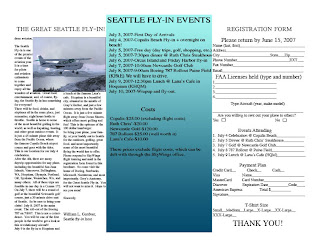
This page consisted of the "registration form" (a required element), a brief description of the event, and the "fly-in" events. This was done using Adobe InDesign, with features such as tab marking and text wrap around an image. It was quite helpful.
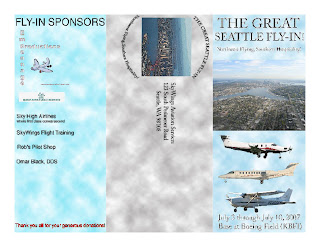
I created all three of these "pages" in Adobe Photoshop, and then brought them over to InDesign. Nothing too exotic here just some angular text, using the magic wand to isolate an airplane from a photograph, and using the Paint Bucket and "cloud" filter for the background effect.

This page consisted of the "registration form" (a required element), a brief description of the event, and the "fly-in" events. This was done using Adobe InDesign, with features such as tab marking and text wrap around an image. It was quite helpful.

I created all three of these "pages" in Adobe Photoshop, and then brought them over to InDesign. Nothing too exotic here just some angular text, using the magic wand to isolate an airplane from a photograph, and using the Paint Bucket and "cloud" filter for the background effect.
Photoshop Fun

This was a little fun I had in photoshop early on. I wanted to show my dad (man with head inverted) what I could do with photoshop and thus came up with this design. By the way, I have since lost 40+ lbs since this picture was taken...
Advertisements
These are two very different advertisements I created for Visual Technology. One is for the Japanese "human umbrella" (hito casa), and the other is for the versatile Cessna 208B Grand Caravan. We utilized various filters and effects, as well as text effects to best market our products. This was a very fun assignment.
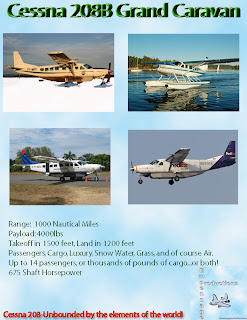
This is an advertisement for the Cessna 208B demonstrating all of its potential elements and configurations. The idea was to show how versatile this aircraft can be. Also, I added a perspective in text effect. This is essentially copying the layers a bunch of time and putting them all in order to create a depth effect. I like this.
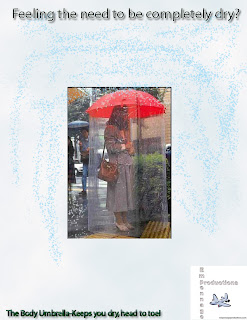
The Japanese umbrella picture was found on a website advertising other "unique" Japanese products. It is humerous, but it is also effective in keeping one dry. I used a rain effect with the paint brush, which scatters little paint drops which look like rain all over.

This is an advertisement for the Cessna 208B demonstrating all of its potential elements and configurations. The idea was to show how versatile this aircraft can be. Also, I added a perspective in text effect. This is essentially copying the layers a bunch of time and putting them all in order to create a depth effect. I like this.

The Japanese umbrella picture was found on a website advertising other "unique" Japanese products. It is humerous, but it is also effective in keeping one dry. I used a rain effect with the paint brush, which scatters little paint drops which look like rain all over.
Shorecrest competition posters
This year, shorecrest had three exciting competitions: The Battle of the Bands, the Film Festival, and the Art Expo. It was the visual tech class' job to design the posters to promote these events. Most of these utilize the "threshold" effect, turning the picture/design into a black and white shaded finish.
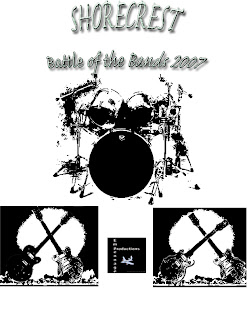
The Battle of the Bands poster is one of my best creations, in my humble opinion. It involves a complicated text effect, much use of the "Dodge and Burn" tools to facilitate use of the threshold filter, and free transform. This is where I utilized free transform best, with clashing guitars in front of a nuclear explosion. I am proud of this one.
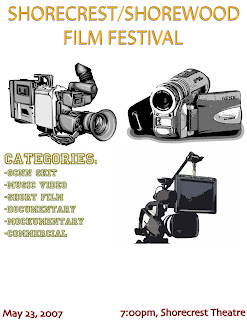
This is my only poster in this category not in threshold. However, I did apply multiple cartoon like filters to get the cameras the way they are. Also, used the "Princeton" font for parts of this. I don't believe I use this font in any other creation.
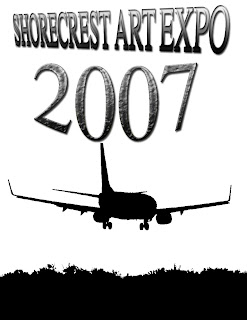
This poster is fun because it involves a picture of a Boeing 737-700. I always love airplane pictures, and learning to manipulate them this year had been quite fun. Also, used the brick texture effect in the "2007" part of the font. A nice addition I think.

The Battle of the Bands poster is one of my best creations, in my humble opinion. It involves a complicated text effect, much use of the "Dodge and Burn" tools to facilitate use of the threshold filter, and free transform. This is where I utilized free transform best, with clashing guitars in front of a nuclear explosion. I am proud of this one.

This is my only poster in this category not in threshold. However, I did apply multiple cartoon like filters to get the cameras the way they are. Also, used the "Princeton" font for parts of this. I don't believe I use this font in any other creation.

This poster is fun because it involves a picture of a Boeing 737-700. I always love airplane pictures, and learning to manipulate them this year had been quite fun. Also, used the brick texture effect in the "2007" part of the font. A nice addition I think.
Greeting Card
This is an aviation related greeting card with a punchline often used to describe the weather in the midwest. This was done using "Layer effects," various filters, and a few custom shape tools.
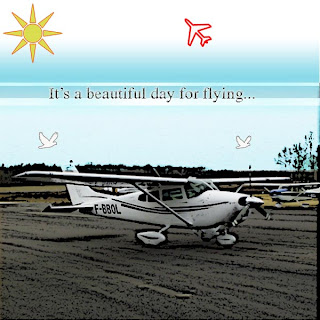
This front part of the card was a little difficult to make becuase I was trying to photoshop in a perfect sky into the rest of the picture. I also used the custom shape tools to create the sun and the airplane. That was very helpful. We used poster edges for the effect on the ground. The text is pretty straight forward, just with a drop shadow thrown in.
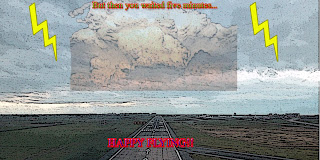
The inside made use of more custom shape tools with the lightning. Once again, we used poster edges for continuity's sake. This is a fun card for aviators, especially in the midwest.

This front part of the card was a little difficult to make becuase I was trying to photoshop in a perfect sky into the rest of the picture. I also used the custom shape tools to create the sun and the airplane. That was very helpful. We used poster edges for the effect on the ground. The text is pretty straight forward, just with a drop shadow thrown in.

The inside made use of more custom shape tools with the lightning. Once again, we used poster edges for continuity's sake. This is a fun card for aviators, especially in the midwest.
Friday, May 25, 2007
People Creations

Using vector art in Adobe Illustrator, I was able to create Rob B., the customer service representative. This was primarily done with tools like ellipses, rectangles, and other polygons.
CD Design
In designing abstracts, we also had to create a CD using the abstract effects that we knew or learned from tutorials. There had to be a Front Cover, an Inside Cover, and a Back Cover. Here it is!

For the back cover, I used the orange abstract design found here (http://www.tutorialized.com/view/tutorial/Orange-Abstract-Design/21772). Admittedly, I improvised with it a little, so it is not exactly the same. Keeping with the theme of abstract, I made all my songs, CD name, and band name perposely abstract/ambiguous.

For the inside cover, I used the digital blast tutorial (http://www.tutorialized.com/tutorial/Digital-Blast/23533). along with blending an airplane picture into the background by adjusting the opacity. The names are just made up, but loosely derived from aviation professionals I have had the pleasure to work with.

For the front cover, I used the radio wave tutorial (http://www.tutorialized.com/tutorial/Radio-Waves/10816) and copied it a whole bunch of times. I also used a wind filter on the text, giving the impression that it was "blasted" by the wind. This assignment was a lot of fun.

For the back cover, I used the orange abstract design found here (http://www.tutorialized.com/view/tutorial/Orange-Abstract-Design/21772). Admittedly, I improvised with it a little, so it is not exactly the same. Keeping with the theme of abstract, I made all my songs, CD name, and band name perposely abstract/ambiguous.

For the inside cover, I used the digital blast tutorial (http://www.tutorialized.com/tutorial/Digital-Blast/23533). along with blending an airplane picture into the background by adjusting the opacity. The names are just made up, but loosely derived from aviation professionals I have had the pleasure to work with.

For the front cover, I used the radio wave tutorial (http://www.tutorialized.com/tutorial/Radio-Waves/10816) and copied it a whole bunch of times. I also used a wind filter on the text, giving the impression that it was "blasted" by the wind. This assignment was a lot of fun.
Star Wars Themed Documents
We all know how much Star Wars means to all of us, and Photoshop is a wonderful medium to have fun with Star Wars in. Everything from creating lightsabres to death stars, Photoshop and Star Wars simply work well together. The lightsabre tutorial can be found under tutorialized.com or by a simple google search.

This I did with a little extra time on my hands. It is me trying to show many of my photoshop skills in one document. Enjoy!


For the peep wars, you just had to design a picture in photoshop involving these sugar candies called "peeps." The first thing that came to mind for me is "Peep Wars," so here it is!

This I did with a little extra time on my hands. It is me trying to show many of my photoshop skills in one document. Enjoy!


For the peep wars, you just had to design a picture in photoshop involving these sugar candies called "peeps." The first thing that came to mind for me is "Peep Wars," so here it is!
O RLY Owl


Frontier Airlines gained much fame by painting animals on the tails of all of their airplanes. Following that theme, I tried my hardest to photoshop the "O RLY OWL" onto the tail of a Frontier Airlines airplane. Here is the result! This involved use of the clone stamp, and a lot of work with the free transform tool to get the O RLY owl formatted on here. I love this one! The registration on the Frontier airplanes go N9XXFR, so we went N9ORLY following that theme.
Logo Design

Early on, we needed to create a "Company" that all our photoshop documents would be presented by, a "Production Company" if you will. Building on the airplane theme again, I chose the name Empennage Productions. Empennage is the tail section of the airplane, where most of the control surfaces are.
Dick of the Dead

Many of us have different opinions about the 46th Vice President of the United States. However, I think we can all agree that he is at least 1/10 zombie if not more. So here is my interpretation of that, using the Shaun of the Dead movie poster.
Self portrait Effects
When I had some extra time to play around in Photoshop, I decided to use some "filters" or "effects" on pictures of myself. There were many different results, and here a few of them!

For this first one, I used the filters known as "poster edges" and "cutout" in order to create this cartoon photo of myself. i really like how it turned out!

This is a filter known as "glowing edges." It has a short of neon effect, and it is quite nice. It can cancel out a lot of the colors around it though.


These two photos are just me using threshold with various amounts of contrast in there. It is fun to change yourself into a black and white image like that. By the way, the other pilot is my mentor, Captain Glenn.

For this first one, I used the filters known as "poster edges" and "cutout" in order to create this cartoon photo of myself. i really like how it turned out!

This is a filter known as "glowing edges." It has a short of neon effect, and it is quite nice. It can cancel out a lot of the colors around it though.


These two photos are just me using threshold with various amounts of contrast in there. It is fun to change yourself into a black and white image like that. By the way, the other pilot is my mentor, Captain Glenn.
"B Movie" Poster

Near the beginning of the semester, we had to create the poster for a "B Movie," or pretty much a cheap, cheesy, not well done horror movie. Being a plane nut, I chose Rabid Cessnas as my evil monsters, who reeked havoc on the civlians of Seattle.
iPod commercial

Apple has created many unique and successful commercials for their products, and the iPod is no different. This effect was created by following the tutorial googled under "iPod photoshop tutorial." This photo is of actor Hugh Laurie (Dr. Gregory House), and he wasa not initially wearing an iPod.
Abstract Designs

http://www.tutorialized.com/tutorial/Radio-Waves/10816 This is a ver cool tutorial that you can do lots with. You can copy and paste it to make rows and rows of radio waves, as the initial one is a little small.

http://www.tutorialized.com/tutorial/Chrome-Ice-Cubes/10565 This was a quick and easy tutorial involving the pentagon tool and a few modifications after that. Looks pretty cool, huh?

http://www.tutorialized.com/view/tutorial/Electromagnetic-Shock/5734 This was an extremely fun tutorial to do. Honestly, I thought the product looked better one step before the final, so I just omitted the last step and here it is.

This is a "splotchy" one that was actually difficult. I unfortunetely cannot find the link for it.

This abstract is sort of a half completed version of the orange one. It involves the same concepts and designs.

http://www.tutorialized.com/view/tutorial/Orange-Abstract-Design/21772 This is probably my favorite abstract here. The orange is real nice, and it wasn't the most difficult thing in the world to create.

http://www.tutorialized.com/view/tutorial/Simple-Glow-Waves-Effect/7602 This was another easy abstract. This took my very little time to finish.

http://www.tutorialized.com/view/tutorial/Abstract-crystal-effect/23382 This was a surprisingly easy abstract to create. I believe it took less than five steps.

This was one of my favorite abstracts. It is quite complex, yet it wasn't too difficult to create. Unfortunately, I cannot find the link to the tutorial.
Text Effects
Using Adobe Photoshop and the tutorials under tutorialized.com, we were able to create various text designs. Here are a few of these effects!

For the cartoon text, I used the text effect found here (http://www.tutorialized.com/view/tutorial/Graffiti-Cartoon-Text-Effect/21062). My result turned out a little different, but still, it was nice!

The gel effect was also found on tutorialized.com (http://www.tutorialized.com/tutorial/Gel-text-effect/21802). I really enjoyed doing this one, and I feel it turned out very well.

(http://www.tutorialized.com/tutorial/Underwater-Text/21835) This underwater text effect blended text with water using opacity and other exciting tools.

This did not turn out the way the tutorial (http://www.tutorialized.com/view/tutorial/Text-with-metal-border/21055) had initially planned. However, it still somehow made a cool text effect out of it.

I really like how this tutorial (http://www.tutorialized.com/tutorial/Stone-Text/20796) turned out. I looks really good, and it is an interesting utilization of photoshop tools.

For the cartoon text, I used the text effect found here (http://www.tutorialized.com/view/tutorial/Graffiti-Cartoon-Text-Effect/21062). My result turned out a little different, but still, it was nice!

The gel effect was also found on tutorialized.com (http://www.tutorialized.com/tutorial/Gel-text-effect/21802). I really enjoyed doing this one, and I feel it turned out very well.

(http://www.tutorialized.com/tutorial/Underwater-Text/21835) This underwater text effect blended text with water using opacity and other exciting tools.

This did not turn out the way the tutorial (http://www.tutorialized.com/view/tutorial/Text-with-metal-border/21055) had initially planned. However, it still somehow made a cool text effect out of it.

I really like how this tutorial (http://www.tutorialized.com/tutorial/Stone-Text/20796) turned out. I looks really good, and it is an interesting utilization of photoshop tools.
Subscribe to:
Posts (Atom)